# What is Moonlander?
Greetings Strider, and welcome to **Moonlander**. We are a decentralized perpetual trading platform on Cronos EVM and zkEVM chain that offers both a staking pool and on-chain perpetuals, primed to empower all Striders with galactic opportunities. Transactions on Moonlander are executed at higher speed and lower fees. This isn’t just trading, this is our financial mission to the moon.
**🚀 Unleash Your Trading Potential**
As a seasoned trader, we know you crave the thrill of the market, the exhilaration of calculated risks, and the satisfaction of astronomical gains. Moonlander is the way through.
* **Astro-Efficiency**: Maximize your capital efficiency with our MLP pool, enabling you to secure larger positions and ride the market's currents with unparalleled power.
* **Galactic Leverage**: Dare to dream big with up to 1000x leverage, propelling your trading endeavors to unprecedented heights.
* **Stellar Security**: Navigate the market confidently, shielded by our robust price feeds from PYTH and Cronos Oracles, ensuring a stable and secure trading environment.
**💰 Chart a Course to Passive Income**
Beyond the thrill of trading, Moonlander also offers a smooth sailing to passive income.
* **Stellar Rewards**: Reap the rewards of the platform's success and benefit from market fluctuation through our fee distribution mechanism without the need for active trading
* **Stake and Prosper**: Stake our utility token or provide liquidity to our MLP pool and earn real yield in CRO/zkCRO and $CM, fueling your galactic ambitions.
🌕 **No Moon Too Far. Join the Moonlander Mission.** 🧑🚀
Together, we'll explore the uncharted territories of decentralized finance, and break free of Earth’s Financial gravity. ☄️
# Our Partners
## TradingView
At Moonlander, we’re committed to empowering traders with the tools they need to navigate the ever-evolving crypto markets. We have integrated with [TradingView](https://www.tradingview.com/), the industry-leading charting platform, to bring you advanced trading tools right at your fingertips. With professional candlestick charts, real-time market data, and a comprehensive suite of technical indicators, you can now analyze price movements, identify trends, and refine your strategies with precision.
This partnership allows you to gain deeper insights into market dynamics, enabling smarter decision-making for both short-term trades and long-term investments. Whether you’re tracking [ETH/USD](https://www.tradingview.com/symbols/ETHUSD/), [BTC/USD](https://www.tradingview.com/symbols/BTCUSD/), or other assets, TradingView’s powerful analytics will help you stay ahead of the curve. Dive into the future of decentralized trading with Moonlander and unlock your full trading potential. 🌕🚀
## VVS Finance
As an extension of our partnership with [VVS Finance](https://vvs.finance/), the leading DEX on Cronos EVM, in our presale, you can now:
1. Purchase $FM by swapping
2. Provide liquidity into $FM/$CRO pool and earn fees
3. Stake your LP token into farm and earn incentives
# Tokenomics
**$FM** is the native governance token of Moonlander that can be staked to earn our protocol revenue and incentives. It has a total supply of 20,000,000,000 (20 billion)
# Roadmap
**Overview**
Moonlander is building the next chapter of on-chain perpetual trading. For too long, trading has been treated as a solitary experience defined only by charts, numbers, and isolated decisions. In reality, trading is shaped by conversations, sentiment, and community-driven momentum.
Moonlander brings this dynamic environment on-chain by creating a perp trading layer where anything can become a market and where social context is integrated directly into the trading experience.
Trading no longer has to be lonely. Moonlander turns it into a shared, community-powered journey.
**Vision: Everything Can Be a Market**
Moonlander expands perpetual trading beyond traditional crypto assets. Traders want more than BTC and ETH; they want to participate in cultural moments, speculate on events, and trade assets and outcomes they care about.
Moonlander is evolving into a unified perp layer where any asset, outcome, or signal can be a market, including:
* Crypto assets
* Real-world assets (RWAs)
* Predictions on real-world events, narratives, and cultural trends
Our core innovation is reframing trading as a social activity rather than a purely analytical one.
[**Prediction Perps**](/how-to-use/trading/prediction-markets) **- Live**
Prediction Perps introduce the ability to trade real-world outcomes with the speed and leverage of perpetuals.
These markets are powered by integrations with data sources such as Polymarket and Kalshi, enabling users to trade outcome-based perps across politics, pop culture, sports, macro events, and crypto narratives.
Prediction Perps allow traders to express views on what the community is discussing while maintaining the familiar mechanics of leveraged perpetual trading.
**Play Mode**
Play Mode is built for traders who want a fast, social, and simplified trading experience without traditional complexity.
The current direction:
Simple directional bets
One-tap entry and instant position flipping
Competitive, social-focused gameplay
Multiplier-style or jackpot-style reward structures
Play Mode offers a lighter, more dynamic approach to perps while retaining meaningful strategy. Additional game modes will be introduced over time.
**Social Insights**
In fast-moving markets, narratives drive attention as much as technical indicators. Moonlander incorporates real-time social context directly into the trading interface.
The potential key components:
* Live X (Twitter) feed integrated per asset
* Trending commentary and sentiment signals
* Top Trader Leaderboards
* Copy trading and bot-assisted strategies
* Narrative heatmaps and sentiment spikes
These tools convert social signals into actionable insights, making trading more informed and more social.
**Smarter and Faster Trading UX**
Moonlander is upgrading its trading engine to deliver an experience comparable to centralized exchanges while maintaining on-chain transparency and self-custody.
Core enhancements under works:
* One-click gasless execution for faster reaction times
* Cross-chain swaps to easily bring capital into Cronos
* AI-enhanced token insights with TA, sentiment, and news
* Personal analytics dashboards for PnL, performance, win rate, and trade history
These improvements aim to make Moonlander accessible, intuitive, and powerful for all trading styles.
**Community Rewards**
Moonlander’s growth is powered by its community. The platform introduces reward systems that align incentives with participation and performance.
*Pioneer Points Program*
Points may be earned through:
Trading volume
Performance-based multipliers
Missions, streaks, and engagement
Referral and affiliate contributions
Rewards may include seasonal airdrops, fee rebates, and platform perks. Point redemption mechanics and reward structures are subject to refinement to ensure long-term sustainability and fairness.
This program is designed to encourage sustainable, skill-based, and community-driven participation.
**The Path Ahead**
The future of trading is not simply about expanding the number of available markets. It is about redefining trading as a social, interactive, and community-powered experience.
Moonlander is building the on-chain trading layer for this future. One where market participation is driven by culture, conversation, and collective momentum, not just charts.
We invite traders to join us on this journey as we continue expanding markets, enhancing tools, and building a social-first trading ecosystem.
Our goal remains the same: To build an on-chain trading platform where markets, culture, and community converge.
As we continue refining this roadmap, your input will play a central role in shaping what comes next.
# 2025 Year-End Review
As 2025 ends, we want to look back at our growth together with our community this year. We began 2025 with a mission on Cronos zkEVM. Today, we end it as a top-tier perp DEX on Cronos EVM, armed with institutional backing, massive liquidity, and a suite of features that bridge the gap between DeFi and TradFi.
## 🌍 Migration & Activity Surge
We kicked off 2025 with core trading features live on **Cronos zkEVM**. In May, expanded to **Cronos EVM**, unlocking more liquidity and accessibility for our users. The results were explosive:
* **Total Trading Volume**: **Surpassed $3.8B**
* **MLP TVL**: Reached **$31M**
* **Rank**: Entered the **Top 10 Perp DEXs** on DeFiLlama
## ⚡ Speed & RWAs
In June, we broke the on-chain barrier by integrating **Real-World Assets (RWAs)**. Starting with the Mag7 stocks like Tesla and Apple, we gave Striders the power to trade traditional equity volatility without ever leaving the blockchain.
After TGE, we improved our trading engine, cutting execution time from 5–10 seconds to **under 2 seconds**, making trading much faster and smoother.
## 🤝 Integrations & Growth
In September, we focused on scaling access and infrastructure:
* **Crypto.co Pay** integration for seamless fiat-to-crypto onboarding
* **Native perp integration** with **Crypto.com Onchain Wallet** — driving **$106M** in volume in just two weeks
* Strategic investment from **Crypto.com Capital**, reinforcing our place in the Cronos ecosystem and aligning us with long-term institutional support
We also launched a **$50K BTC Trading Contest**, attracting over **2,000 participants** and further fuelling our active user base.
## 🔮Innovation & Upgrade
In Q4, we launched new features and laid the groundwork for 2026:
* **Prediction Perps**: Speculate on real-world events with leverage
* **UX Upgrades**: Smoother, faster trading flow
* **Cross-Chain Swaps**: Onboard and bridge assets seamlessly
* **Language Support**: Chinese and Korean now live - Moonlander is going global 🌐
Behind the scenes, we quietly rolled out major protocol-level improvements, including **circuit breakers**, **slippage model enhancements**, and **indexer upgrades**, making Moonlander faster, safer, and more reliable.
In 2025, we shipped **20+ features**, grew to **$3.8B+ in total volume**, and made **social trading** a real part of the Moonlander experience.
In 2026, we aim to bring even **more RWAs, more gamified features, and grow our user base by 10x**.
Thank you, #CROFAM & Striders. We are going to the Moon together.
# Fund Your Wallet
Fund your wallet to embark on the journey to the moon. You can take one of the following paths:
1. [Cronos EVM](/how-to-use/fund-your-wallet/cronos-evm)
2. [Cronos zkEVM](/how-to-use/fund-your-wallet/cronos-zkevm)
# Cronos EVM
# Swap from Any Chain
Moonlander's Cross-chain Swap feature enables seamless asset transfers from any supported EVM chain to Cronos, you can initiate swaps directly from our funding page. This cross-chain functionality is powered by [Relay](https://relay.link/bridge), providing a secure and efficient bridge replacement that supports multiple EVM chains.
Follow these steps to complete a swap:
1. Select “Swap from any chain” in the Add Funds page, click it to open the swap modal.\

2. Choose the source chain from the dropdown and input the amount you want to swap in the "From" field. Then confirm your destination chain and output token.\

3. Review the estimated output, slippage, price impact and the estimated gas fee. You may also click to adjust slippage tolerance before you confirm.\

4. If the preview looks good, click Approve and Swap to proceed. You may need to confirm and approve the transaction details in your wallet, then you are all set!
{% hint style="info" %}
* Make sure you have sufficient source funds in your wallet to cover swap and gas fees.
* Bridges can vary, you may need to wait a few minutes before the transaction is completed.
* Cross-Chain Swaps make multi-chain trading effortless on Moonlander. If you have questions or need help with a specific route, please raise a ticket via [Discord](https://discord.com/invite/22fGfHPcmW).
{% endhint %}
# Swap on VVS Finance
## Who should use this?
Any Strider with existing assets on Cronos EVM.
## How to use this?
**Step 1.** Go to
**Step 2.** Under the “You Pay” token dropdown menu, select the token you want to let go of. Then select the token you want to receive under the “You Receive” token dropdown menu. Enter the amount you wish to swap and check the estimated amount you’ll receive.
**Step 3.** Click "Swap" to proceed. Your wallet will prompt you to approve the transaction. Once confirmed, your tokens will be swapped and you will receive the desired tokens.
# Withdraw from CEX
## Who should use this?
Any Strider with existing assets on CEX such as Crypto.com.
## How to use this?
**Step 1.** Visit the CEX you have been using. Go to your account and choose the desired token to “Withdraw”.
**Step 2.** Under the network to withdraw to, select “Cronos EVM”. Make sure their CEX and token support withdrawal to Cronos EVM, or else your tokens may be lost.
**Step 3.** Enter the wallet address to receive the token. Proceed with the approval steps on the CEX.
**Step 4.** Upon successful withdrawal, you should receive the tokens in your wallet on Cronos EVM network.
# VVS Finance Cross Chain Swap (Bridge)
## Who should use this?
Any Strider with none existing assets on Cronos EVM.
## Why use Cross Chain Swap?
* Seamless way to move funds from popular source chains to Cronos EVM
* No separate bridge UI needed; swap and bridge happen in one flow
* Ideal for funding your wallet with USDC (Cronos EVM) for use as margin on Moonlander
* Remember to keep a small amount of CRO on Cronos for gas
## Prerequisites
* A crypto wallet (e.g., Onchain Wallet, MetaMask, etc.) connected to your browser
* The Cronos EVM network added to your wallet provider
* Sufficient gas tokens on your source chain, and plan to have a small amount of CRO for gas on Cronos EVM after the swap
## How to use this?
The Full Step by Step Details: [VVS Finance documentation (Cross Chain Swap)](https://docs.vvs.finance/guides/bling-swap/cross-chain-swap#how-to-make-a-cross-chain-swap)
VVS Cross Chain Swap:
## Notes
* Recommended destination asset: USDC (Cronos EVM) for Moonlander collateral or MLP liquidity
* The Cross Chain Swap is powered by a third-party provider, Relay. Usage is subject to VVS/Relay terms and fees
# Credit/Debit Card via Crypto.com Pay
## Who should use this?
Any Strider who wants to quickly acquire USDC or CRO on Cronos EVM using Credit Card or Debit Card.
## How to use this?
**Step 1.** Entry points
You can start a purchase from multiple locations in the app:
* Wallet page → click “Buy” next to USDC or CRO
* Trade page → click the “+” icon next to Bal. within Collateral
* Supply liquidity page (Buy & Stake $MLP) → click “+” icon next to Bal. within Liquidity Supply
**Step 2.** Choose purchase method
* Select Buy with Card if you want to buy with fiat (credit card and debit card).
**Step 3.** Selecting Crypto.com Pay will open a new browser tab to the Crypto.com Pay checkout page. By default, the page will show:
* Pay $100 USD → Receive xxx $USDC (amount auto-calculated).
* Your connected wallet address is pre-filled as the recipient.
**Step 4.** Enter your email and confirm with a 6-digit verification code.
**Step 5.** Provide required personal information to proceed.
**Step 6.** Select your preferred payment method (credit card or debit card).
**Step 7.** Confirm payment. Once successful, the purchased USDC/CRO will be sent directly to your connected wallet on Cronos EVM.
# Cronos zkEVM
# Swap on H2 Finance
## Who should use this?
Any Strider with existing assets on Cronos zkEVM.
## How to use this?
**Step 1.** Go to
**Step 2.** Under the “You Pay” token dropdown menu, select the token you want to let go of. Then select the token you want to receive under the “You Receive” token dropdown menu. Enter the amount you wish to swap and check the estimated amount you’ll receive.
**Step 3.** Click "Swap" to proceed. Your wallet will prompt you to approve the transaction. Once confirmed, your tokens will be swapped and you will receive the desired tokens.
# Bridge via official Cronos zkEVM Bridge
## Who should use this?
Any Strider with existing assets on Ethereum.
You can bridge assets from Ethereum to Cronos zkEVM to obtain zkCRO, vETH, and vUSD.
* zkCRO for gas fees payment, collateral payment, $MLP staking
* vUSD for collateral payment, $MLP staking
## How to use this?
1. [Deposit CRO for zkCRO](/how-to-use/fund-your-wallet/cronos-zkevm/bridge-via-official-cronos-zkevm-bridge/deposit-cro-for-zkcro)
2. [Deposit USDC for vUSD](/how-to-use/fund-your-wallet/cronos-zkevm/bridge-via-official-cronos-zkevm-bridge/deposit-usdc-for-vusd)
3. [Deposit USDT for vUSD](/how-to-use/fund-your-wallet/cronos-zkevm/bridge-via-official-cronos-zkevm-bridge/deposit-usdt-for-vusd)
4. [Deposit DAI for vUSD](/how-to-use/fund-your-wallet/cronos-zkevm/bridge-via-official-cronos-zkevm-bridge/deposit-dai-for-vusd)
# Deposit CRO for zkCRO
zkCRO is used across the Cronos zkEVM ecosystem. Apart from using it to pay gas fees, you can also earn yield just by holding it.
## Before depositing CRO via the bridge
First, you need to hold CRO on Ethereum. You can purchase CRO via one of the following ways:
1. Swap on[ Uniswap](https://app.uniswap.org/swap)
2. Buy on a centralized exchange and withdraw to Ethereum
## Bridging CRO from Ethereum to Cronos zkEVM
**Step 1.** Head to[ https://zkevm.cronos.org](https://zkevm.cronos.org/) and connect your wallet.
**Step 2.** On the “Deposit” tab, select CRO in the “FROM” field. zkCRO will be automatically selected in the “TO” field.
**Step 3.** Enter the amount of CRO you want to bridge. Keep in mind that some additional CRO is needed to pay the gas fees.
**Step 4.** Click “Deposit”
**Step 5.** Confirm (1) approval transaction for the bridge to spend your CRO and (2) CRO deposit transaction
**Step 6.** Your zkCRO should arrive in less than 10 minutes. You can check your zkCRO wallet balance in the top right-hand corner.
# Deposit USDC for vUSD
vUSD can be used across the Cronos zkEVM Ecosystem. It is pegged 1:1 to USD but you can earn yield just by holding it.
## Before depositing USDC via the bridge
First, you need to hold USDC on Ethereum. You can purchase USDC via one of the following ways:
1. Swap on[ Uniswap](https://app.uniswap.org/swap)
2. Buy on a centralized exchange and withdraw to Ethereum
## Bridging USDC from Ethereum to Cronos zkEVM
**Step 1.** Head to[ https://zkevm.cronos.org](https://zkevm.cronos.org/) and connect your wallet.
**Step 2.** On the “Deposit” tab, select USDC in the “FROM” field. vUSD will be automatically selected in the “TO” field.
**Step 3.** Enter the amount of USDC to bridge. Keep in mind that ETH is needed to pay the gas fees.
**Step 4.** Under the hood, the bridge will swap the USDC for DAI for you before it deposits it into vUSD. Check that the slippage, price impact, and min received amount are to your liking. You may change the slippage by clicking on it.
**Step 5.** Click “Deposit”
**Step 6.** Confirm (1) approval transaction for the bridge to spend your USDC and (2) DAI deposit transaction
**Step 7.** Your vUSD should arrive within less than 10 minutes. You can check your vUSD wallet balance in the top right-hand corner.
# Deposit USDT for vUSD
vUSD can be used across the Cronos zkEVM Ecosystem. It is pegged 1:1 to USD but you can earn yield just by holding it. Depositing USDT also earns you points in the[ pioneer program](https://blog.cronos.org/p/announcing-the-cronos-zkevm-pioneer).
## Before depositing USDT via the bridge
First, you need to hold USDT on Ethereum. You can purchase USDT via one of the following ways:
1. Swap on[ Uniswap](https://app.uniswap.org/swap)
2. Buy on a centralized exchange and withdraw to Ethereum
### Bridging USDT from Ethereum to Cronos zkEVM
**Step 1.** Head to[ https://zkevm.cronos.org](https://zkevm.cronos.org/) and connect your wallet.
**Step 2.** On the “Deposit” tab, select USDT in the “FROM” field. vUSD will be automatically selected in the “TO” field.
**Step 3.** Enter the amount of USDT to bridge. Keep in mind that ETH is needed to pay the gas fees.
**Step 4.** Under the hood, the bridge will swap the USDT for DAI for you before it deposits it into vUSD. Check that the slippage, price impact, and min received amount are to your liking. You may change the slippage by clicking on it.
**Step 5.** Click “Deposit”
**Step 6.** Confirm (1) approval transaction for the bridge to spend your USDT and (2) DAI deposit transaction
**Step 7.** Your vUSD should arrive within less than 10 minutes. You can check your vUSD wallet balance in the top right-hand corner.
# Deposit DAI for vUSD
vUSD can be used across the Cronos zkEVM Ecosystem. It is pegged 1:1 to USD but you can earn yield just by holding it. Depositing DAI also earns you points in the Pioneer Program.
## Before depositing DAI via the bridge
First, you need to hold DAI on Ethereum. You can get DAI via one of the following ways:
1. Swap on [Uniswap](https://app.uniswap.org/swap)
2. Buy on a centralized exchange and withdraw to Ethereum
## Bridging DAI from Ethereum to Cronos zkEVM
**Step 1.** Head to and connect your wallet.
**Step 2.** On the “Deposit” tab, in the “FROM” field select DAI and vUSD will automatically appear in the “TO” field.
**Step 3.** Enter the amount of DAI to bridge. Keep in mind that ETH is needed to pay the gas fees.
**Step 4.** Click “Deposit”
**Step 5.** Confirm (1) approval transaction for the bridge to spend your DAI and (2) DAI deposit transaction
**Step 6.** Your vUSD should arrive within 10 minutes, just check your vUSD wallet balance in the top right hand corner then.
# Withdraw from CEX
## Who should use this?
Any Strider with existing assets on CEX such as Crypto.com.
## How to use this?
**Step 1.** Visit the CEX you have been using. Go to your account and choose the desired token to “Withdraw”.
**Step 2.** Under the network to withdraw to, select “Cronos zkEVM”. Make sure their CEX and token support withdrawal to Cronos zkEVM, or else your tokens may be lost.
**Step 3.** Enter the wallet address to receive the token. Proceed with the approval steps on the CEX.
**Step 4.** Upon successful withdrawal, you should receive the tokens in your wallet on Cronos zkEVM network.
# Trading
**Embark on a Prodigious Trading Mission to the Moon 🧑🚀**
Moonlander isn’t just a platform; it is your launchpad, a vessel designed to transport you to the celestial heights of astronomical gains. Together, we will embark on this interstellar journey, reaching for the moon and beyond.
🛰️ **Astro Capital Efficiency**: Trading pairs on the platform share liquidity via our MLP pool. It supports a broader range of trading pairs without fragmenting liquidity, ensuring smoother trading experiences. Hence, it is not required to separately add liquidity for each newly listed trading pair, maximizing capital efficiency and allowing Striders to open bigger position sizes.
💲 **Low Fees & Slippage**: Enjoy low trading costs and take advantage of our enticing incentives.
🌌 **Stellar Security**: We utilize price feeds from both PYTH and Cronos oracles, ensuring the highest level of protection against abnormal price behavior and unexpected liquidations.
👛 **Maintain custody of your funds**: You have complete control over your assets as opposed to custodial platforms like CEX. Enjoy the freedom to open and close positions without the hassle of manual deposits or withdrawals.
⚡ **Galactic Leverage**: Experience the thrill of trading with up to 1000x leverage. Seize the opportunity to maximize your gains during periods of high volatility by leveraging your capital to the extreme, all while enjoying incredibly low fees.
Using **500x, 750x, and 1000x**, you can experience:
* **Zero Price Slippage**: Execute trades with precision and avoid the pitfalls of price slippage.
* **Zero Open Fees**: Enter positions without paying open fees.
* **Dynamic Close Fees**: Our dynamic PnL-based close fee system enables you to take risks while incurring only minimal fees on losses.
* **Focus on Your Trading**: Avoid the distractions of margin management and concentrate solely on your trading strategy.
**This is not for the faint of heart**. It's a playground for experienced traders who dare to push the boundaries of leverage and risk. Are you ready to reach the moon? 🚀🌕
# Moonlander Liquidity Pool (MLP)
Moonlander Liquidity Pool (MLP) is the counterparty of all trades on Moonlander. Users can provide liquidity by supplying any of the supported assets and auto-stake $MLP (read more [here](/how-to-use/staking/usdmlp-moonlander-liquidity-pool)).
In order to trade on Moonlander, traders need to pay collateral using any of the supported assets in the MLP:
* Cronos EVM: USDC
* Cronos zkEVM: zkCRO, vUSD
Profits made by traders will be paid out by the MLP, while losses made by traders will be collected by MLP.
When traders open positions, the collateral is not immediately sent to the MLP; instead, they are temporarily held in a designated area known as the “margin pool.”
Upon closing their positions, the following occurs:
* If traders achieve a profit, the margin will be withdrawn from the margin pool and returned to them, while their profits will be sourced from the MLP.
* Conversely, if traders incur a loss, the loss amount will be deducted from the margin pool and transferred to the MLP. The remaining margin will then be returned to the traders.
# Trade Lifecycle
Read the following sections to understand more about the trade lifecycle.
1. [1-Click Trading](/how-to-use/trading/trade-lifecycle/1-click-trading)
2. [Open Position](/how-to-use/trading/trade-lifecycle/open-position)
3. [During a Trade](/how-to-use/trading/trade-lifecycle/during-a-trade)
4. [Close Position](/how-to-use/trading/trade-lifecycle/close-position)
5. [Liquidation](/how-to-use/trading/liquidation)
# 1-Click Trading
**Experience Wallet-Less Speed**
Moonlander's 1-Click Trading feature allows you to execute your trades with unprecedented speed and convenience. By setting up an Auto-Sign wallet, you can bypass repetitive wallet signature prompts for common trading actions, enabling you to trade in a single click. This feature is designed to streamline your trading experience without compromising security.
**How It Works**\
1-Click Trading leverages a delegate wallet system secured by a user-defined PIN. This delegate wallet is uniquely tied to your main connected wallet and is authorized to submit transactions on your behalf.
**Setting Up Your Auto-Sign Wallet**
To enable 1-Click Trading, you need to set up an Auto-Sign wallet. This process involves two simple steps:
1. Create Your 4-Digit PIN\
\
After entering your PIN, you will need to sign a message in your connected wallet to confirm the creation of your PIN. This step links your PIN to your wallet and generates the delegate wallet.
{% hint style="info" %}
**Important:**
* This PIN will be used to secure your Auto-Sign wallet. Keep it confidential.
{% endhint %}
2. Approve the Delegate Wallet\
\
You need to approve this delegate wallet to submit transactions on behalf of your connected wallet. You will be prompted to sign a transaction in your connected wallet to grant these permissions.
Once these steps are completed, your Auto-Sign wallet is set up and ready for 1-Click Trading. You can easily toggle 1-Click Trading on and off from your Portfolio -> Wallet section.
\

\
When Auto-Sign is off, you will be prompted for on-chain signing for every transaction.
{% hint style="info" %}
**Notes**
* To enable 1-Click Trading, you need to ensure your connected wallet has sufficient gas funds. The Auto-Sign wallet will draw gas from your connected wallet to execute transactions.
* Market order remains gasless for which 1-Click Trading reinforces.
* You have full control over the permissions granted to your Auto-Sign wallet. You can reset or disable the feature at any time.
* If you wish to revoke permissions or start fresh, you can use the "Reset" option available next to your Auto-Sign wallet details. This will require you to go through the setup process again.
{% endhint %}
# Open Position

Select your desired trading pair and open a long/short position.
| Step | Description |
| ----------------------------------------------------------------------- | ------------------------------------------------------------------------------------------------------------------------------------------------------------------------------------------------------------------------------------------------------------------------------------------------------------------------------------------------------------------------------------------------------------------------------------------------------------------------------------------------------------------------------------- |
| 1. Choose your Order Type |
Market Order
Buying/selling immediately at the current market price
Limit Order
Buying/selling only when the market price reaches your specified target price
not applicable to 500x, 750x, 1000x leverage
|
|
Enter the Collateral to be used
|
You can pay collateral by using any of the assets supported in MLP:
Cronos EVM: USDC
Cronos zkEVM: vUSD, zkCRO
|
|
Set the desired Leverage
|
1-100x
available to all traders
trading pairs may have different max leverage
500x, 750x, 1000x - unlock by fulfilling staking requirement:
|
{% hint style="info" %}
Note that positions under the same trading pair will be created as individual positions upon each position creation. They will not be unified.
{% endhint %}
{% hint style="info" %}
Once the maximum open interest (OI) is reached for Long and Short Positions respectively for a trading pair, opening position in that direction will be temporarily suspended. This helps to
* prevent excessive losses in MLP in case of adverse market movements
* maintain market stability by preventing the accumulation of disproportionately large positions that could impact market dynamics
{% endhint %}
# During a Trade
| Step | Description |
| --------------------------------------------------------------- | ----------------------------------------------------------------------------------------------------------------------------------------------------------------------------------------------------------------------------------------------------------------------------------------------------------------------------------------------------------------------------------------------------------------------------------------------------------------------------------------------------------------------------------------------------------------------------------------------------------------------------------------------------------- |
|
Accumulate Fee
|
Holding Fee
The longer you hold your position, the more holding fee will be charged upon closing the position.
Pay/Earn Funding Fee
depending on whether you are holding Long/Short position
When Long OI > Short OI, the Long positions will pay Funding Fee, while the Short positions will earn Funding Fee.
When Long OI < Short OI, the Long positions will earn Funding Fee, while the Short positions will pay Funding Fee.
Holding Fee and Funding Fee are combined, displayed, and charged as Holding Fee on our platform.
See Fees for more information
|
|
Manage Collateral
|
Minimum collateral ratio to maintain: 15%
For Open Positions, you can only add Collateral. Withdrawal is not allowed.
Adding Collateral is only available for the 1-100x leverage range
All trade-related fees are charged from the collateral. Make sure you put aside sufficient collateral to cover the fees to prevent liquidation.
|
|
Manage Take Profit/Stop Loss Orders
| TP/SL orders cannot be canceled once created. You can only edit the order. |
# Close Position
Close your position at your desired price.
| Step | Description |
| --------------------------------------------------------- | ------------------------------------------------------------------------------------------------------------------------------------------------------------------------------------------------------------------------------------------------------- |
|
Receive the profit/remaining collateral
|
All fees will be deducted from your collateral and sent to the MLP
You can only choose the token to receive the profit/remaining collateral in for Market Close Order
Slippage is fixed
|
|
Pay Fees
|
Close Fee, Execution Fee, and Holding Fee are charged when closing positions
Fees are deducted from your collateral before sending the profit/remaining collateral to your wallet
See Fees for more information
|
# Liquidation
Liquidation can be triggered by the following:
* Market price hitting the liquidation price (See [this page](/how-to-use/trading/liquidation) for more information)
* Having insufficient collateral to cover fees
When either situation occurs, your position will be closed automatically. Collateral will be used to pay off the losses and sent to the $MLP pool as a liquidation fee.
# Take Profit/Stop Loss Orders
**Take Profit (TP) orders** are utilized to automatically close a position and secure profits once the market price hits a predetermined level:
* Long Positions: above the entry price
* Short Positions: below the entry price
Conversely, **Stop Loss (SL) orders** are employed to automatically close a position and limit losses once the market price reaches a preset level:
* Long Positions: below the entry price
* Short Positions: above the entry price
## How should the TP/SL orders be set?
| | TP | SL |
| --------------- | ---------------------------------------------------------------------------------------------------------------- | --------------------------------------------------------------------------------------------------------------------------------------------------------------------------------------------------------------------------------------------------------------------------------------- |
| Long Positions | Place it at a price level **higher than the entry price** where you intend to close the trade and secure profits |
Place it at a price level
Lower than the entry price to close the trade and prevent additional losses, and
Higher than the liquidation price to prevent liquidation rather than simply closing the position.
|
| Short Positions | Place it at a price level **lower than the entry price** where you intend to close the trade and secure profits |
Place it at a price level
Higher than the entry price to close the trade and prevent additional losses, and
Lower than the liquidation price to prevent liquidation rather than simply closing the position.
|
# Trading RWA
Moonlander is bringing real-world assets trading to Cronos EVM chain, starting with **equities at up to 50x leverage**! This expands your trading opportunities beyond crypto, enabling exposure to traditional markets in DeFi without holding the underlying assets.
## **Trading Hours and Restrictions**
For holidays, see this link for details:
{% hint style="info" %}
* Note that [funding rate](/how-to-use/trading/fees#funding-fee) will continue to apply during off hours. Users are reminded to monitor their positions and manage their collateral to prevent liquidation.
* In the event that the liquidation condition is met during off hours, [liquidation](/how-to-use/trading/liquidation) will be executed when the market opens again.
{% endhint %}
## **Open and Close Fee**
RWA trading pairs enjoy a lower open and close fee at **0.02% of position size**.
## Reduced Leverage / Increased Spread
To maintain orderly and fair trading conditions, Moonlander may apply temporary adjustments on RWA markets during major corporate or market-moving events.
These adjustments may include:
* Leverage
* Funding rates
* Spread
**When These Adjustments Apply**
Risk parameters may be temporarily adjusted during major events such as:
* Stock splits
* Earnings announcements
* Dividend distributions
* Other significant corporate actions or high-volatility events
**Effective Timing**
These adjustments typically take effect starting 2 days prior to the event and may remain active until market conditions stabilize.
{% hint style="info" %}
* Specific parameters and timing may vary. Adjustments do not affect the existing positions.
{% endhint %}
# Liquidation
## :clock1: When will liquidation be triggered?
* Market price hitting the liquidation price
* Having insufficient collateral to cover fees
## :abacus: How is Liquidation Price calculated?
{% tabs %}
{% tab title="Long Position" %}
Liquidation Price = Entry Price - (Collateral \* Liquidation Lost Rate - Fees) / Position Size in Quantity
{% endtab %}
{% tab title="Short Position" %}
Liquidation Price = Entry Price + (Collateral \* Liquidation Lost Rate - Fees) / Position Size in Quantity
{% endtab %}
{% endtabs %}
* Fees include: Close Fee, Holding Fee and Funding Fee
* Liquidation Loss Rate = 85%
* Position Size in Quantity = Initial Collateral \* Leverage / Entry Price
{% hint style="info" %}
When the position loses >= 85% of its value, it will be liquidated.
{% endhint %}
## :moneybag: What happens to the remaining collateral?
Liquidated positions are covered by MLP. Any remaining collateral will be transferred to MLP upon liquidation so there is no refund. This applies to both regular mode and degen mode at 500, 750, 1000x
# Fees
## Open and Close Fee
It is charged when opening and closing positions.
| | 1-100x | 500x, 750x, 1000x |
| --------- | ---------------------- | ------------------------------------------------------------- |
| Open Fee | 0.05% of position size | N/A |
| Close Fee | 0.05% of position size | 0.03% of position size or 15% of profit, whichever is higher. |
{% hint style="info" %}
RWA trading pairs enjoy a lower open and close fee at **0.02% of position size**.
{% endhint %}
## Execution Fee
USD 0.1 in collateral token is charged when opening and closing positions to cover the gas cost of our Keeper bots.
## Holding Fee
It is charged when closing positions. The fee is calculated based on the size of the position and the duration for which the Strider holds it:
{% tabs %}
{% tab title="" %}
Holding Fee = Position Size \* Entry Price \* (Number of Seconds Held) \* Holding Fee Rate Per Second
{% endtab %}
{% endtabs %}
## Funding Fee
Depending on the position you hold, it can be charged/paid to you when closing position.
It is used to balance the Long and Short Open Interest (OI) and to protect MLP liquidity providers from excessive risk exposure.
* When Long OI > Short OI, the Long positions pay funding fee, while the Short positions earn funding fee.
* When Long OI < Short OI, the Long positions earn funding fee, while the Short positions pay funding fee.
The fee is calculated at every second and automatically adjusts as the market fluctuates. Throughout the position's duration, it may either accrue or incur funding fees intermittently. The fee is deducted/added to the collateral of the position and is reflected in the unrealized PnL of the position, directly impacting the position’s liquidation price. When closing the position, the final funding fee is reconciled.
You may find the funding fee rate under each trading pair.
Note that Funding Fee and Holding Fee are combined, displayed, and charged as Holding Fee on our platform.
Here is how the Funding Fee is calculated:
### Base Interest Rate
The fundingFeePerSecondP represents the base interest rate calculated and reported per second by an off-chain keeper. This keeper retrieves the daily closing price for each trading pair from the Pyth API and then calculates this parameter using historical price data.
The base interest rate is determined by multiplying the Annualized Historical Volatility by a constant k:
{% tabs %}
{% tab title="" %}
Base Interest Rate = k \* HV
where HV is the Annualized Historical Voltaility
{% endtab %}
{% endtabs %}
The base interest rate is an annualized interest rate. It is further converted into a per-second rate:
{% tabs %}
{% tab title="" %}
Base Interest Rate Per Second = Base Interest Rate / (365 \* 24 \* 3600)
{% endtab %}
{% endtabs %}
### Basic Funding Rate
Basic funding rate per second is calculated based on the Long/Short OI and base interest rate discussed above:
{% tabs %}
{% tab title="" %}
If longOI != shortOI
basicFundingRatePerSecond = baseInterestRatePerSecond \* (longOI - shortOI) / max(longOI, shortOI)
if abs(basicFundingRatePerSecond) < minFundingFeeR
basicFundingRatePerSecond = minFundingFeeR
else if abs(basicFundingRatePerSecond) > maxFundingFeeR
basicFundingRatePerSecond = maxFundingFeeR
else
basicFundingRatePerSecond = 0
{% endtab %}
{% endtabs %}
The basic funding rate calculated above is positive when Long OI exceeds Short OI. This suggests that Long positions are required to pay the funding fee to Short positions. Conversely, a negative basic funding rate indicates that Short positions are paying the funding fee to Long positions.
The variable baseInterestRatePerSecond (also known as fundingFeePerSecondP) represents the basic funding fee rate in a one-sided market condition, where either Long OI or Short OI is 0.
# Spread
**Spread** refers to the difference between the market price and the **execution price** you receive when opening or closing a position. On our platform, spread can be fixed or dynamically calculated based on multiple factors, and it applies **to all order types at the time of execution**.
## :abacus: How Spread Is Calculated?
Our platform adopts both **fixed** and **dynamic spread** model across the trading pairs.
For **dynamic spread**, it takes takes into account:
* **Existing Open Interest** on the trading pair
* **Size of the New Position** being opened
* **Platform Liquidity**
This approach ensures that spread adjusts with market conditions, helping reflect the true execution cost more accurately.
## :currency\_exchange: Market Orders
* You can set slippage tolerance on market orders when opening a position.
* In the confirmation step, the estimated entry price includes spread, based on current platform settings.
* The final execution price will closely match the estimated entry price, assuming normal market conditions.
## :currency\_exchange: Limit Orders
* Slippage tolerance does not apply to limit orders.
* In the confirmation step, the trigger price is exactly what you input.
* When the price is reached and the order is executed, the execution price will be adjusted by the spread.
## :currency\_exchange: Closing a Position
* The mark price reflects the current market price.
* At execution, spread is applied to determine the final close price.
## :currency\_exchange: Take Profit / Stop Loss (TP/SL)
* TP/SL prices are user-defined and do not include spread.
* At execution, spread is applied just like with limit orders.
* The estimated PnL shown in the UI already takes spread into account, giving you a more accurate preview.
## :mag: TLDR
Spread is **applied at execution** for all order types:
Order Type
Notes
Market Order
Est. entry price shown includes spread
Limit Order
Trigger price is user input; execution price includes spread
Close Position
Spread applied to mark price at the time of closing
Take Profit/Stop Loss
Execution price includes spread; Est. PnL reflects it
# Leverage Mode Comparison
| | 1-100x | 500x, 750x, 1000x |
| ----------------------------------------- | --------------------------------------------------------------------------------------- | -------------------------------------------------------------------------------------------------------- |
| Who can use |
Open to all traders \* trading pairs may have different max leverage
|
Stake $MLP to unlock
Cronos EVM: 200 $MLP
Cronos zkEVM: 1000 $MLP
|
| Available order type | Market, Limit | Market |
| Able to add collateral to open positions? | Yes | No |
| Open fee | 0.05% of position size | N/A |
| Close fee | 0.05% of position size | 0.03% of position size or 15% of profit, whichever is higher. |
| Execution fee | USD 0.3 in collateral token | USD 0.3 in collateral token |
| Holding fee | Same for both modes. See [here](/how-to-use/trading/fees#holding-fee) for calculation. | Same for both modes. See [here](/how-to-use/trading/fees#holding-fee) for calculation. |
| Funding fee | Same for both modes. See [here](/how-to-use/trading/fees#funding-fee) for calculation. | Same for both modes. See [here](/how-to-use/trading/fees#funding-fee) for calculation. |
# Settings
Moonlander provides a unified Settings panel that allows users to customize their platform experience. The Settings menu is accessible from the top navigation bar via the Settings icon. The following options are currently available:

**Language Settings**
Users can switch the platform interface between the available languages:
* English (default)
* Chinese
* Korean
Language preferences apply immediately across the entire platform.
**PnL Display Settings**
Moonlander allows traders to choose how Profit and Loss (PnL) values are displayed across the platform through a global toggle.
| Update | Description |
| ----------------------------------- | ---------------------------------------------------------------------------------------------------------------------------------------------------------------------------------------------------------------------------------------------------------------------------------------------------------------------------------------------------------------------------------------------------------------------------------------------- |
| Global Toggle in the Settings Panel |
The Settings icon is located in the top navigation bar
Selecting it opens the Settings panel
A toggle option labeled “Show PnL After Fees” controls how PnL numbers are displayed
Default: ON (PnL shown after fees), consistent with current behavior
|
| Platform-Wide Application |
The toggle affects all PnL displays across Moonlander, including:
Open Positions
Trade History
My Trade Unrealized PnL
Portfolio → Trade tab
PnL shown will reflect:
PnL After Fees when the toggle is set to After Fee
PnL Before Fees when the toggle is set to Before Fee
This setting only changes what is displayed, not the underlying calculation.
|
| Updated Labeling |
To avoid confusion:
All Realised PnL values are always labeled “Realised PnL”
They do not show additional labels such as “before fees” or “after fees,” regardless of toggle position
|
# Prediction Markets
{% hint style="warning" %}
**Prediction Markets have been deprecated as of February 2026.** Trading, creation, and settlement are no longer supported.
{% endhint %}
Ready for real-world speculation, amplified? Moonlander Leveraged Prediction Trading — an exciting frontier where speculation meets real-world events, supercharged by high leverage and powered by lightning-fast settlement. Whether you’re betting on Bitcoin hitting new heights, election outcomes, or major sports events, Moonlander gives you the tools and transparency to trade confidently and instantly.
**What is it?**
Leveraged Prediction Trading lets you speculate on whether real-world events will happen within specified timeframes, with the option to amplify your gains (and risks) through leverage. Unlike traditional prediction markets that settle well after events conclude, Moonlander’s innovative approach uses live data aggregated from the most trusted prediction sources to settle positions in near-real-time.
This means you experience the thrill of fast-paced trading, making moves based on unfolding events and market sentiment — not long waits for final official resolutions.
**How it works?**
Our proprietary in-house oracle pulls live prices from multiple reputable prediction markets, aggregating them into a single reliable index for each supported event. This index drives the price you trade on and determines market settlement, ensuring transparency and fairness.
When you open a position, just like regular perp trading where you can either long or short, set your leverage, collateral, and risk controls like take-profit and stop-loss. Market prices indicate the perceived probability of an event happening, as interpreted by traders. You’ll be bound by a **minimum holding period** before you can manually close, but **positions can be liquidated immediately if risk limits are breached**.
Markets close either on a scheduled expiry or if a price threshold is met and sustained, with all closure reasons and settlement prices clearly displayed.
**Why Moonlander?**
Moonlander is built on the robust Cronos EVM and zkEVM blockchains, combining high speed, low fees, and strong security to help you trade smarter. We offer:
* Instant and transparent settlement based on live aggregated market signals
* A diverse set of event-driven markets easily discovered and traded alongside standard perpetual pairs
* Clear risk management rules including minimum holding periods and liquidations
If you’re looking for a faster, fairer, and more thrilling way to play the markets, Moonlander offers exactly that.
# Opening a Prediction Position
Ready to trade?
**Step 1: Choose Your Market**
* Discover events ranging from major crypto milestones (e.g., “Bitcoin will reach $150K by 2026”) to real-world occurrences like elections and sports championships. Use the left sidebar or the search box to find markets that match your interests and strategy.
* Select the market and the side you want to take: Long (bet on probability rising) or Short (bet on probability falling).
*Tip: Check the market’s expiry times and minimum holding periods listed in the market details pane.*

**Step 2: Configure Your Trade Parameters**
* Leverage: Select how much leverage you want to apply to amplify your position. Remember, higher leverage can multiply gains but also risks.
* Collateral: Enter the amount you want to commit as collateral for this position.
* Order Type: Choose from market or limit orders, depending on your preferred execution style.
* Take Profit (TP) / Stop Loss (SL): Set your exit strategy to lock in gains or limit losses. TP/SL values must stay within the market’s allowed price range.

**Step 3: Confirm Minimum Holding Period**
* Note that your position cannot be closed manually before the minimum holding period - configured per market. This restriction helps maintain fair trading conditions. You can, however, adjust collateral, TP, and SL anytime during this period.
**Step 4: Review and Place Your Order**
* Review all details carefully, including event information, current price, leverage, and trade size. Confirm your order placement through the UI. Orders outside allowed limits will be blocked with clear error messages to help you adjust.
# Prediction Market Format
Each prediction market has a binary outcome. For example: "BTC will reach $150,000 by 2026".
Users can open positions in two directions:
* **Long Position:** Betting on the probability of the event increasing (similar to a "YES" probability rising or "NO" falling on Polymarket).
* **Short Position:** Betting on the probability of the event decreasing (similar to a "NO" probability rising or "YES" falling on Polymarket).
Price represents the market-implied probability of the event. For example, if the current price is $0.70, this indicates that the market collectively assigns a 70% likelihood to the event occurring..
The price always ranges between $0.001 and $0.999. A price closer to $0.999 indicates a higher perceived probability of the event happening, while a price closer to $0.001 indicates a lower perceived probability.
If you are long on the event, you expect the price to move closer to $0.999. If you are short, you expect it to move closer to $0.001.
**Example:** A user believes the probability of "U.S. Strategic BTC Reserve purchases new BTCs" is underestimated.
The current price is $0.65 (65% probability).
A user opens a long position with 10 USDC at 10x leverage.
If the price rises to $0.80 (80% probability),
Profit = (current price - entry price) x position size = ($0.80 - $0.65) x 100 = $15
# Settlement & Market Closure
Moonlander’s Prediction Market employs clear and transparent rules to determine when a market closes and how all open positions are settled. These mechanisms are designed to ensure fairness for all participants and provide you with predictable market outcomes.
Here are the two ways of how markets can close:
1. **Scheduled Expiry**
Each market on Moonlander has a specific, pre-determined closure time. This time is always clearly displayed within the market’s interface. When the scheduled time arrives, the market automatically closes, and the positions will be settled based on the latest price at expiry.
2. **Price Threshold with Time Window**
Markets can also close automatically before their scheduled expiry if the aggregated market price for a specific outcome crosses and then sustains a defined threshold.
**How it works:** If the price for an outcome goes above a certain high threshold (e.g., >0.9, meaning a strong consensus for “probability of the event occuring”) or below a certain low threshold (e.g., <0.1, meaning a strong consensus for “probability of the event not occuring”), and this price holds for a set period (e.g., 15 minutes), the market will be closed.
**Settlement price:** It’s important to note that when a market closes due to a price threshold being reached, all positions are settled at that specific threshold price (e.g. 0.9 or 0.1), not the most recent aggregated price at the exact moment of closure. Slippage will also apply dynamically based on platform parameters meaning the final effective execution price may vary slightly depending on market conditions and liquidity at settlement.
*Note: All closure rules and outcomes are clearly displayed in the UI with real-time status updates.*
####
### Scenario/Example
**Scheduled Expiry**
{% stepper %}
{% step %}
Market: “Oscar Piastri will be the F1 Drivers Champion of 2025” (UTC time).
Expiry: 2025-12-07 12:00:00 UTC.
{% endstep %}
{% step %}
At exactly 2025-12-07 12:00:00 UTC, the market closes regardless of price movement in the underlying prediction markets afterward.
All existing positions will be closed at the latest aggregated price.
{% endstep %}
{% endstepper %}
Why it matters:
Some prediction markets may resolve in later dates due to resolution efforts or dispute. However, that does not affect the settlement of the leveraged market on our platform.
**Price Threshold with Time Window**
* Market: “ETH will reach $5,000 before 1st January 2026” (UTC).
* Scheduled expiry: 1st January 2026 at 23:59 UTC.
* Thresholds:
* Upper threshold: $0.95 (very likely “Yes”).
* Lower threshold: $0.05 (very likely “No”).
* Time window: 30 minutes sustained.
*Scenario A — Early Closure Triggered*
{% stepper %}
{% step %}
On 1st January 2026 at 14:00 UTC, the aggregated price rises above 0.9.
The price stays above $0.95 until 14:30 UTC (30 minutes).
{% endstep %}
{% step %}
Market will be closed at 14:30 UTC.
All positions settle at $0.95, not at the exact latest price (e.g. $0.97).
Even if the market would have gone to 0.95 later, everyone’s “Long” positions settle at 0.9 since the threshold price and time window have been triggered and sustained.
{% endstep %}
{% endstepper %}
*Scenario B — Temporary Spike (No Closure)*
{% stepper %}
{% step %}
Price spikes to $0.97 but drops back to $0.85 after 15 minutes.
{% endstep %}
{% step %}
No market closure since the condition wasn’t sustained for the full 30 minutes.
The market remains open until either another sustained trigger or scheduled expiry.
{% endstep %}
{% endstepper %}
### FAQ: Settlement & Position Management Examples
What If Scenarios
System Behavior
Example Outcome
Scheduled expiry
Market closes automatically at the predefined expiry time using the latest aggregated price.
Market “BTC will reach $130K by Friday” closes on Friday at 23:59 UTC; Position settles at closing price.
Price threshold w/ time window
If the price crosses a threshold (e.g., >0.9 or <0.1) and stays there for the set minutes (e.g. 30 mins), the market closes at that threshold price.
Price threshold at $0.9 (30 mins time window), the market price reached $0.9 for 30 mins → the market closes; all positions settle at $0.9.
Price threshold limits caps TP/SL and limit order price
If the price threshold is set to >0.9 and <0.1 for 30 mins, the user can only set TP/SL and limit order within that price range.
Price threshold at >0.9 and <$0.1 (30 mins time window), the user cannot set SL or order price at 0.05.
Threshold crossed shortly before expiry
Market closed by scheduled expiry using the latest aggregated price.
Price threshold at $0.9 (30 mins time window), the market price reached $0.95 for 5 mins while the time reached expiry timestamp → the market settles at $0.9 at expiry time.
Market price exceeds threshold range (e.g. outside 0.1–0.9)
The system temporarily disables the ability to open new positions in that market. Existing positions remain open until settlement or market closure.
If the price threshold reaches 0.92, users can no longer open new positions, but existing traders continue holding until the market settles.
Closure before minimum holding elapsed
Market closure overrides individual hold timers; all positions force-settled at closure price.
Trader opens a position 3 mins before closure → position still settled at market closure price.
Liquidation before minimum holding elapsed
Liquidation executes instantly upon margin breach; independent of holding rules.
Price drops to liquidation level after 1 min → position liquidated immediately.
TP/SL before minimum holding elapsed
TP/SL always executes immediately, even during the minimum hold period.
TP at 0.8 → price hits 0.8 → closes even though minimum hold period = 10 min.
Edit TP/SL or add collateral
Editing TP/SL or collateral is allowed anytime; doesn’t reset the minimum holding timer.
# Staking
Moonlander offers three different staking pools to fuel our Striders’ missions **without the need for active trading**:
1. $MLP staking - Moonlander Liquidity Pool
2. $FM staking - our native governance token
3. $CM staking - time-locked version of $FM
## Fee Distribution
**Open & Close fees** will be distributed as follows:
* **60% to Moonlander Liquidity Pool** as rewards to $MLP stakers
* **20% to Staking Pool** as rewards to $FM and $CM stakers
* **20% to Moonlander Treasury**
**All of the following fees will go into Moonlander Liquidity Pool:**
* Holding fees paid by traders
* Losses and liquidation made by traders
* MLP mint and burn fees by stakers
# $MLP (Moonlander Liquidity Pool)
**Moonlander Liquidity Pool** acts as the counterparty of all trades executed on Moonlander. It comprises a series of bluechip assets like $BTC, $ETH, and stablecoins. Asset weightage of the pool will vary based on the deposits and withdrawals by liquidity providers.
**$MLP** is the index token of all the underlying assets in the MLP. By providing liquidity to the MLP, you are buying and auto-staking $MLP, which allows you to earn a portion of the protocol revenue.
## 🖐️ How can I buy and stake $MLP?
You can buy $MLP with any of the supported assets in the MLP with a mint fee. MLP mint fee varies depending on the weightage of the assets in the MLP. If the weightage is lower than the target percentage, you can buy $MLP with that asset at a lower fee, and vice versa. This maintains MLP’s target composition as liquidity providers are incentivized to balance the pool. Once you have purchased the $MLP, it will be auto-staked to start earning rewards.
Our Moonlander Liquidity Pool and $MLP are preparing for launch. Buckle up, Striders.
## 💹 How much does it cost to buy/sell $MLP?
* The rate depends on the MLP composition and the token you are trying to buy/sell
* Buying/selling with stablecoins: 0 - 0.3%
* Buying/selling with non-stablecoins: 0 - 0.7%
* Check our website to see the latest rate:
* Visit
* Go to “$MLP Overview” > “Pool Composition”
{% hint style="info" %}
Currently, buying/selling MLP on Cronos EVM with USDC costs \~0.25%.
{% endhint %}
{% hint style="info" %}
There is a 24-hour cooling period between buying and selling $MLP.
{% endhint %}
## 💰 What rewards do I get by staking $MLP?
You will earn the following rewards by staking $MLP:
* **$CM** - time-locked version of our native token $FM
* **$MLP price growth** - as fees and trader losses are added into the liquidity pool, increasing $MLP value
**Below are what go into MLP as rewards to stakers:**
* **60%** of Open & Close fees
* All of the following fees:
* Holding fees paid by traders
* Losses and liquidation made by traders
* MLP mint and burn fees by stakers
As the price of $MLP increases over time — driven by protocol revenues such as trading fees and trader losses— your staked $MLP becomes more valuable.
When you eventually sell $MLP and withdraw your underlying liquidity, you'll receive more tokens than you initially deposited, reflecting the growth in $MLP value. This price appreciation acts as a **passive yield** on top of any $CM emissions you earn while staking.
## 🧮 How is the price of $MLP calculated?
{% tabs %}
{% tab title="" %}
Price of $MLP = AUM / $MLP Supply
where AUM = sum of (poolTokenAmount \* tokenPrice) + unrealizedPnL
{% endtab %}
{% endtabs %}
The value of AUM is derived from
1. The composition of the MLP pool, i.e. amount of each asset in the pool
2. The price of each underlying assets
3. Fees collected from traders and stakers - open/close fees, holding fees, MLP mint and burn fees
4. Profits paid out to traders, or loss gained from traders
5. Staking yield earned by smart contracts from vTokens
## 💱 How does unrealized PnL impact MLP?
Think of the MLP pool as Mission Control for all trading operations. While we serve as the counterparty to all trades, the difference between long and short positions (net Open Interest) is what impacts our pool most, as it reflects the overall market exposure of traders within Moonlander:
**Positive Unrealized PnL:**
* MLP pool prepares to distribute rewards to traders
* Pool liquidity will decrease hence price of $MLP will remain stagnant or decrease
**Negative Unrealized PnL:**
* MLP pool receives the money lost by traders
* Pool capacity grows hence price of $MLP will increase
# $FM (Full Moon token)
**Made in the image of the full moon**, **$FM** is the native governance token of Moonlander that can be staked to earn our protocol revenue and incentives.
## 💰 What rewards do I get by staking $FM?
You can earn the following rewards by staking $FM:
* **$CM** - time-locked version of our native token $FM, generated at a fixed rate per second
* **Protocol revenue in $CRO -** coming from 20% of all Open & Close fees collected from traders
## 🖐️ How can I get $FM?
Visit to purchase $FM on Cronos EVM.
## :coin: What is $FM's tokenomics?
$FM has a total supply of 20,000,000,000 (20 billion).
# $CM (Crescent Moon token)
**Just as the crescent moon takes time to become a full moon**, **$CM** is the time-locked version of $FM and it is not transferable between wallets. With $CM, you can stake it to earn even more rewards or convert it to $FM.
## 💰 What rewards do I get by staking $CM?
You can earn the following rewards by staking $CM:
* **More $CM**
* **Protocol revenue in $CRO** - coming from 20% of all Open & Close fees collected from traders
$CM rewards generated by $FM staking will be given at a **fixed rate per second**. Each staked $CM will enjoy the same reward APR% as $FM, which means that staking $CM increases your share of rewards; similar to if you had staked more $FM into the staking pool.
## 💱 How can I convert $CM to $FM?
You can convert $CM to $FM every sec for **365 days** at the exchange rate of **1:1**. Converted $CM can be claimed at any time.
To initiate the conversion, you need to have sufficient **converting power**, which stands for the initial amount of staked $FM or $MLP used to earn the $CM rewards.
Insufficient converting power means you have unstaked some of the $FM/$MLP earlier. You will either have to
1. Reduce the number of $CM you want to convert, or
2. Stake more $FM/$MLP to increase your converting power
Once the conversion is initiated, the initial amount of staked $FM or $MLP that was used to earn the $CM rewards **will be reserved**. The reserved $FM/$MLP can be unstaked once the conversion is completed.
> **Example**:
>
> You have staked 1000 $FM and earned 10 $CM from the staking. 1000 $FM will be your converting power to convert the 10 $CM into 10 $FM.
Note that staked $FM/$MLP reserved for conversion will **continue to earn rewards**, while $CM that has been unstaked and deposited for conversion will not be earning staking rewards anymore.
{% hint style="info" %}
* The converting power balance will only update after the corresponding $CM rewards from the $MLP or $FM staking pools are claimed. If the rewards are not claimed, the converting power balance will remain unchanged, even if more is staked into the reward pools.
{% endhint %}
## 🖐️ How can I get $CM?
It can be earned by staking $FM or $MLP.
# Revenue Share
**Open & Close fees** will be distributed as follows:
* **60% to Moonlander Liquidity Pool** as rewards to $MLP stakers
* **20% to Staking Pool** as rewards to $FM and $CM stakers
* **20% to Moonlander Treasury**
**All of the following fees will go into Moonlander Liquidity Pool.:**
* Holding fees paid by traders
* Losses and liquidation made by traders
* MLP mint and burn fees by stakers
# EVM Expansion Contest
## Part 1: Trading Competition
### 🌕 How to enter
* Trade any token pairs on Moonlander Cronos EVM to enter the weekly competition and climb the leaderboard
* Participants will be ranked by total trading volume each week
### 🌕 Weekly competition schedule
* Week 1: May 12 00:00am UTC - May 18 11:59pm UTC
* Week 2: May 19 00:00am UTC - May 25 11:59pm UTC
* Week 3: May 26 00:00am UTC - Jun 1 11:59pm UTC
* Week 4: Jun 2 00:00am UTC - Jun 8 11:59pm UTC
### 🌕 Reward
Reward for the top 10 traders each week:
Rank
Reward
1
USD 700 in USDC
2
USD 500 in USDC
3
USD 400 in USDC
4-10
USD 130 in USDC
All rewards will be distributed to the winners after the end of the campaign.
### 🌕 How to check my rank and weekly competition result?
* Leaderboard ranking will be posted on our Discord server on a daily basis during the event period.
* Top 10 traders will be announced at the end of each week as well
* Visit to check
* Note: Trading volume is counted daily from 00:00 am UTC to 11:59 pm UTC.
## Part 2: Community Raffle
### 🌕 How to enter
From May 12, 2025 00:00am UTC - Jun 9, 2025 11:59pm UTC, fulfil any of the following criteria to enter:
* Make at least 1 trade of min. USD50 on Moonlander Cronos EVM, OR
* Add liquidity to MLP of min. USD50 on Moonlander Cronos EVM
### 🌕 Reward
10 lucky winners will be randomly picked to USD500 worth of USDC each.
Rewards will be distributed to the winners after the end of the campaign.
# $FM Presale
{% hint style="info" %}
:tada: **One More Week to Boost Your Allocation** :tada:
We're extending the $FM pre-sale eligibility window by one more week, giving you extra time to increase your trading volume and secure a larger $FM allocation!
To participate in the pre-sale, you must verify by submitting your eligible wallet address here:\
{% endhint %}
We will be launching our native governance token [$FM](https://docs.moonlander.trade/how-to-use/staking/usdfm-full-moon-token) soon 🚀 You can earn purchase quota by trading on our platform and participate in presale to get $FM allocation. Get ready, Striders!
## How to participate in TGE?
1️⃣ **Step 1. Eligibility Period: Trade on Moonlander to earn quota**
**When:**
* Jul 8, 2025 Tues 5:00pm HKT to Jul 29, 2025 Wed 5:00pm HKT
**How it works:**
* Accumulate >=USD15K trading volume during this period to be eligible for the presale
* The more you trade, the more $FM you can purchase in presale. Presale quota is capped at USD2K worth of $FM for each eligible participant
* Snapshot will be taken on Jul 29, 2025 Wed 5:00pm HKT
**How is the quota calculated?**
* Presale quota for each user is calculated by:\
(User’s accumulated trading volume / total trading volume during the campaign period) \* $FM allocation for presale
**Where can I check my quota?**
* Visit to check
2️⃣ **Step 2. Presale Period: Deposit funds to purchase $FM**
**When:**
* Aug 1, 2025 Fri 5:00pm HKT - Aug 4, 2025 Mon 9:00am HKT
**How it works:**
* In partnership with [VVS Finance](https://vvs.finance/) and [Wolfswap](https://wolfswap.app/swap), users need to deposit **$VVS, $CRO or $MOON on Cronos EVM** in a designated wallet address to purchase $FM.
* No minimum deposit is required. The wallet address will be announced on socials closer to the presale period.
* The price of $VVS $CRO $MOON will be determined and announced on socials before the presale period.
* The final $FM allocated to each user is calculated based on the quota earned from trading on Moonlander, and deposit amount
3️⃣ **Step 3. Receive $FM allocation**
**When:**
* Aug 5, 2025 Wed
**How it works:**
* After TGE, eligible users will receive their $FM allocation in 2 batches
* Batch 1: 50% unlocked at TGE, directly received in wallet
* Batch 2: 50% unlocked after 1 month, directly received in wallet
## Revenue Share
After the $FM TGE, our Staking Module will be launched, allowing token holders to stake their $FM to earn [$CM](https://docs.moonlander.trade/how-to-use/staking/usdcm-crescent-moon-token) and revenue in $CRO.
Revenue share after the launch of Staking Module will be updated as follows:
* All Open & Close fees will be distributed as follows at launch:
* 60% to Moonlander Liquidity Pool as rewards to $MLP stakers via auto-compounding
* 20% to $FM/$CM Staking Vaults as rewards to stakers
* 20% to Moonlander Treasury
* All other fees collected by us will be auto-compounded back into the MLP pool
## FAQ
**What happens if I deposit more funds than my quota?**
Funds exceeding the quota for each eligible user will be refunded to users
**What happens if I deposit tokens other than $VVS $CRO $MOON?**
The deposit will not be eligible and they will not be refunded.
\
**What happens if I deposit outside the presale period?**
The deposit will not be eligible and they will not be refunded.
# $50K Voyage Trading Competition
Moonlander’s new trading competition takes place from September 15, 2025 to October 13, 2025, with **a prize pool of USD 50,000 worth of BTC** for top participants. Rewards are distributed in proportion to each participant’s points earned based on leaderboard position.
**Duration & Snapshot Schedule**
* Start Date: September 15, 2025
* End Date: October 13, 2025
* Weekly Snapshots: Every Monday at \~00:00 UTC; leaderboards and point progress posted in [Discord](https://discord.gg/22fGfHPcmW) (#trading-competition)
**Prize Pool Breakdown**
* Total Rewards: $50,000 worth of BTC
* Distribution: Based on each participant’s proportional share of total points earned by eligible users
**Participation Steps**
* Trade eligible perpetual pairs on Moonlander Cronos EVM during the event
* Accumulate at least 1,000 points to qualify for rewards
* Check [Discord](https://discord.gg/22fGfHPcmW) regularly updates, leaderboard posts, and featured token announcements
**Point System**
* Weekly leaderboards published in [Discord](https://discord.gg/22fGfHPcmW) (#50K-BTCVoyage)
* Trading featured tokens earns extra points during campaign period; subject to updates
* Points are recorded weekly at snapshot times
🏆 *Points earned during this campaign period may contribute to a larger point program for a future $FM airdrop.*
Action
Points Earned
USD 1 in trading volume
1 point
Trade on featured token of the week
(may be adjusted by Moonlander as needed)
2x points (max $5,000 volume per day per wallet)
1st trader by PnL at the end of campaign
5,000 points
2nd trader by PnL at the end of campaign
3,000 points
3rd trader by PnL at the end of campaign
2,000 points
4th-10th traders by PnL at the end of campaign
1,000 points
Trade at least $2,000 volume during the first week
2,000 points (one-time bonus)
Trade on 5 different days during the campaign
500 points (one-time bonus)
Trade on 10 different days during the campaign
1,000 points (one-time bonus)
Trade on 20 different days during the campaign
2,000 points (one-time bonus)
Trade at least once in a given week
500 points (max once per week)
Stake >= 5,000 FM during the campaign
1,000 points (one-time bonus)
Early supporter - traded between May Cronos EVM launch to competition start
1,000 points (one-time bonus)
**Notes**
* Moonlander reserves the right to disqualify any wallets suspected of abuse or in violation of the competition
* Moonlander reserves the right to change the competition format, rules, mechanics or prizes in its sole and absolute discretion, at any time without prior notice
# Zero-Fee Stocks Trading
Moonlander is introducing **Zero-Fee Stocks Trading** to make it easier for new users to experience trading synthetic equities on-chain.
**Duration**
* **LIMITED TIME OFFER** starting from Sep 15, 2025 at 9AM UTC for one month only
* Fee rebate will be airdropped to the eligible users within the following month
**Eligibility**
* Available to new users of the month
* Example: If the current month is September, eligibility applies to wallets making their **first trade on Moonlander in September**
* Eligible for trading on any pairs tagged with **“Stock”**
**Rules**
* A fee rebate pool is available, **capped at $25,000 per month**, distributed on a first-come, first-served (FCFS) basis according to accumulated trading volume of the month
* Each wallet will be eligible for the fee rebate **up to $500,000 trading volume** per month
* Each wallet can receive a maximum of **$250 fee rebate** per month
**Notes**
* Once the rebate cap ($25,000) is reached, no further rebates will be issued
* Moonlander reserves the right to disqualify any wallets suspected of abuse or in violation of the competition
* Moonlander reserves the right to change the competition format, rules, mechanics or prizes in its sole and absolute discretion, at any time without prior notice
# $50K Voyage Trading Competition - Season 2
Moonlander’s $50K Voyage trading competition season 2 is here! This guide explains how to join, how to earn points, and how rewards are distributed – so you can focus on trading.
**🗓️ Campaign Period**
* Start: Jan. 22nd 2026 9:00 UTC
* End: Feb. 25th 2026 9:00 UTC
Final rewards will be distributed after the campaign ends and results are verified. (Approximately 1 month after campaign ends)
**🔥 What’s New in Season 2?**
Compared to Season 1, Voyage Season 2 introduce:
* Multiple ways to earn points
* Bonus multipliers for Onchain wallet trading, staking participation, team participation
* A strong focus on consistent participation
**✅ How to Participate**
You can earn points in two main ways during the campaign:
* Earn 1 point for every $1 USD of trading volume
* Earn 1 point per day for every $1 USDC staked in MLP
{% hint style="info" %}
Only new trading position and MLP staking after the trading competition begins can qualify for earning points.
{% endhint %}
**✨ Bonus Point Multipliers**
You can increase your trading points by unlocking bonus multipliers.
{% hint style="info" %}
These bonuses apply to trading points only, not staking points.
{% endhint %}
| Event | Multiplier | Description |
| ------------------------ | ---------- | --------------------------------------------------------------------------------------------------------------------------------------------------------------------------------------------------------------------- |
| Trade via Onchain Wallet | 1.1x | Trading through the Onchain wallet perps tab |
| Stake 50,000 FM | 1.1x | Maintain a stake of at least 50,000 FM |
| Join A Team | 1.1x |
Join a Strider team using a valid team code
Note: You cannot switch teams after joining
|
| Team Volume Milestones | 1.1x |
Additional bonuses unlock when your team reaches total trading milestones
$50M team volume → 1.1x
$100M team volume → 1.1x
These bonuses activate once the milestone is reached
|
**👥 Joining a Team (Strider Team)**
Teams are led by selected community partners, you can join by:
* Entering a team code on the campaign page, or
* Using a referral link shared by the Strider
{% hint style="info" %}
* A wallet signature is required to confirm team joining and team selection is final once joined.
* Joining a team is optional – you can participate solo.
{% endhint %}
**💰 Rewards & Distribution**
* $50,000 worth of BTC guaranteed for the reward pool
* If total campaign trading volume reaches $500M, an additional $50,000 worth of $FM are added to the pool
Rewards are distributed proportionally based on points.
{% hint style="info" %}
Your reward = (Your points / Total campaign points) x Reward pool
{% endhint %}
**🪙 Precious Metals Boost**
To reward diversified and strategic trading, Voyage Season 2 introduces a time-limited boost for Precious Metals trading.
*Increased Leverage*
* XAU (Gold) & XAG (Silver) max leverage increased to 50x
* Applies for a limited promotional window\
*Time-Limited Trading Multiplier*
* Period: Jan 29 09:00 UTC - Feb 12 09:00 UTC
* 1.1x points multiplier on all XAU & XAG trading volume
* Multiplier applies to trading points only
*Precious Metals Trading Rankings*
At the end of the 2-week period, traders will be ranked by their total XAU + XAG trading volume during the campaign window.
Bonus multipliers applied to overall Voyage points after the competition ends:
| Rank | Bonus Multiplier |
| ---------- | ---------------- |
| 1st – 3rd | 1.25x |
| 4th – 5th | 1.15x |
| 6th – 10th | 1.10x |
These bonuses stack on top of your final Voyage Season 2 points.
{% hint style="info" %}
This is a time-limited event. Rankings and bonus multipliers are finalized after the campaign window closes.
{% endhint %}
**❓ FAQs**
* **Can I join without a team?**
* Yes. Joining a team is optional.
* **How are points tracked?**
* Points are tracked continuously during the campaign. You can check your points at during the campaign period.
* **Do existing positions count?**
* Only trading activity during the campaign period is counted.
* **Can I leave or change teams?**
* No. Team selection is final once confirmed.
* **Do bonuses apply retroactively?**
* No. Bonuses apply only to trading activity after they are unlocked.
* **Is wash trading allowed?**
* Activity is monitored. Abnormal behavior may be excluded from rewards.
{% hint style="info" %}
Moonlander reserves the right to disqualify any wallets suspected of abuse or in violation of the competition.
{% endhint %}
# Supported Tokens
## Cronos EVM
Token
Address
USDC
0xc21223249CA28397B4B6541dfFaEcC539BfF0c59
MLP
0xb4c70008528227e0545Db5BA4836d1466727DF13
FM
0x37888159581ac2CdeA5Fb9C3ed50265a19EDe8Dd
CM
0x5449239f7F6992D7d13fc4E02829aC90B2bEa6D1
## Cronos zkEVM
Token
Address
wzkCRO
0xC1bF55EE54E16229d9b369a5502Bfe5fC9F20b6d
vUSD
0x5b91e29Ae5A71d9052620Acb813d5aC25eC7a4A2
MLP
0xe8E4A973Bb36E1714c805F88e2eb3A89f195D04f
# Smart Contracts
## Cronos EVM
Contract
Address
Moonlander
0xE6F6351fb66f3a35313fEEFF9116698665FBEeC9
MLP
0xb4c70008528227e0545Db5BA4836d1466727DF13
FM
0x37888159581ac2CdeA5Fb9C3ed50265a19EDe8Dd
CM
0x5449239f7F6992D7d13fc4E02829aC90B2bEa6D1
StakedFmTracker
0x7eC427359d3470128f2A6C3d4c141AF158ed3A04
StakedFmDistributor
0xB7Fe13C40D9E4cD4b549fD1766e4ef74ef06330d
FeeFmTracker
0xbF438c48Eff2b47F4e77Ea72dbC6588aB4f849CC
FeeFmDistributor
0x6F27c8aCeD67424D3E7c7F42997489586b21F2f6
StakedMlpTracker
0x071788084370497ED1Ac19C6711bd1d4Af0E9034
StakedMlpDistributor
0x8Dbebe40e6bE35cF1bE07b22Aa5fa11f4768917E
## Cronos zkEVM
Contract
Address
Moonlander
0x02ae2e56bfDF1ee4667405eE7e959CD3fE717A05
MLP
0xe8E4A973Bb36E1714c805F88e2eb3A89f195D04f
# Security Audit
Our smart contract have been audited by [Certik](https://www.certik.com/) - one of the largest web3 security service provider. You can find the security audit reports below:
{% file src="/files/yCpqpMaM1MWJnQzQVLf9" %}
{% file src="/files/XXDAVEjwc1Ugeiyn4nw7" %}
{% file src="/files/2DoK98vJj45GJS593u4F" %}
{% file src="/files/2FKRTBqYWfIc1Ign9vfd" %}
{% file src="/files/ct4CSCgkc8S4H4gI4OSR" %}
# Usage Disclaimer
MOONLANDER IS NOT OFFERED TO PERSONS OR ENTITIES WHO RESIDE IN, ARE CITIZENS OF, ARE INCORPORATED IN, OR HAVE A REGISTERED OFFICE IN THE UNITED STATES OF AMERICA OR ANY RESTRICTED TERRITORY, AS DEFINED BELOW (ANY SUCH PERSON OR ENTITY FROM THE UNITED STATES OF AMERICA OR A RESTRICTED TERRITORY, A “**RESTRICTED PERSON**”). **WE DO NOT MAKE EXCEPTIONS**; THEREFORE, IF YOU ARE A RESTRICTED PERSON, THEN DO NOT ATTEMPT TO USE OR USE THE INTERFACE. USE OF A VIRTUAL PRIVATE NETWORK (E.G., A VPN) TO USE OUR SERVICES AS A RESTRICTED PERSON OR FROM THE UNITED STATES OF AMERICA OR A RESTRICTED TERRITORY (DEFINED BELOW) IS PROHIBITED.
**OTHER RESTRICTED TERRITORIES**
* Afghanistan
* Burma (Myanmar)
* Burundi
* Central African Republic
* China, People's Republic
* Congo, Dem. Rep.
* Crimea Region
* Cuba
* Eritrea
* Guinea-Bissau
* Guinea, Republic of
* Iran
* Iraq
* Korea, North
* Lebanon
* Libya
* Mali
* Somalia
* South Sudan
* Sudan
* Syria
* Venezuela
* Yemen
* Zimbabwe
**TRADING OF RWAS ARE NOT AVAILABLE** for persons or entities who reside in, are citizens of, are incorporated in, or have a registered office in the following jurisdictions:
* Canada
* United Kingdom
* States in the European Economic Area:
* Austria
* Belgium
* Bulgaria
* Croatia
* Cyprus
* Czechia
* Denmark
* Estonia
* Finland
* France
* Germany
* Greece
* Hungary
* Iceland
* Ireland
* Italy
* Latvia
* Liechtenstein
* Lithuania
* Luxembourg
* Malta
* Netherlands
* Norway
* Poland
* Portugal
* Romania
* Slovakia
* Slovenia
* Spain
* Sweden
**TRADING OF PREDICTION PERPS ARE NOT AVAILABLE** or persons or entities who reside in, are citizens of, are incorporated in, or have a registered office in the following jurisdictions:
* Canada
* United Kingdom
* States in the European Economic Area:
* Austria
* Belgium
* Bulgaria
* Croatia
* Cyprus
* Czechia
* Denmark
* Estonia
* Finland
* France
* Germany
* Greece
* Hungary
* Iceland
* Ireland
* Italy
* Latvia
* Liechtenstein
* Lithuania
* Luxembourg
* Malta
* Netherlands
* Norway
* Poland
* Portugal
* Romania
* Slovakia
* Slovenia
* Spain
* Sweden
* Brazil
* Australia
* Hong Kong
* Singapore
* Korea, South
* States in the Gulf Cooperation Council:
* Bahrain
* Kuwait
* Oman
* Qatar
* Saudi Arabia
* United Arab Emirates
# Risk Disclosure
The Moonlander protocol (“**Protocol**”) is a set of smart contracts made available by Moonlander on a voluntary, “as-is” and “as available” basis. It is not a service of any kind and you should not rely on Moonlander to assist you to evaluate the Protocol, assess its fitness for any purpose or comply with any requirements. You assume all risks arising from interactions with the Protocol including without limitation all applicable legal and regulatory risks in connection with the use and interaction with the Protocol, including with respect to any transactions. Nothing stated relating to the Protocol is a prospectus nor a solicitation for investment and does not pertain in any way to an offering of securities in any jurisdiction. Nothing stated related to the Protocol constitutes a recommendation or advice of any kind. Moonlander is not liable for any claim, damages or other liability, whether in contract, tort or under any other theory of liability, arising from, out of or in connection with the Protocol.
There are several risks when using the Protocol. These risks include inherent risks associated with the use of a virtual platform, the decentralized nature of the Protocol, and participating in virtual asset transactions. Risks include, without limitation:
* Partial or total loss of virtual assets, including any value attributed to virtual assets;
* Collapse in liquidity with respect to virtual assets;
* Changes in compatibility of a virtual asset with the Protocol;
* Changes in the smart contracts;
* Regulatory uncertainty and government action against virtual assets and persons involved in virtual asset activities;
* Extreme volatility with respect to transaction parameters and value attributed to virtual assets;
* Possibility of market misconduct by participants including for example market manipulation, trading on the basis of non-public information, and front running;
* Delays in or complete failure of virtual asset transactions being confirmed;
* Counterparty risk;
* Faults, defects, hacks, exploits, errors or unforeseen circumstances occurring in respect of the platform or the technologies that the Protocol depends on;
* Loss of private keys; and
* Attacks on the Protocol or the failure of the technologies that the Platform depends on including for example distributed denial of service, sybil attacks, phishing, social engineering, hacking, smurfing, malware, double spending, majority-mining, consensus-based or other mining attacks, misinformation campaigns, forks, and spoofing.
* This list of potential risks is not exhaustive and is not intended to capture the extent of all possible risks. In the event of any of the above occurring, you may lose your virtual assets entirely. Participants should consider all of the above and assess the nature of, and their own appetite for relevant risks independently and consult their own professional advisers before making any decisions to participate in the Protocol. **PARTICIPANTS USE THE PROTOCOL AT THEIR OWN RISK.**
# Terms and Conditions
{% file src="/files/wZG6SZu0XLGXBiLWGsY8" %}


.png?alt=media&token=6f1eba47-f7d7-4f7d-a9b1-a0b447fc111a)
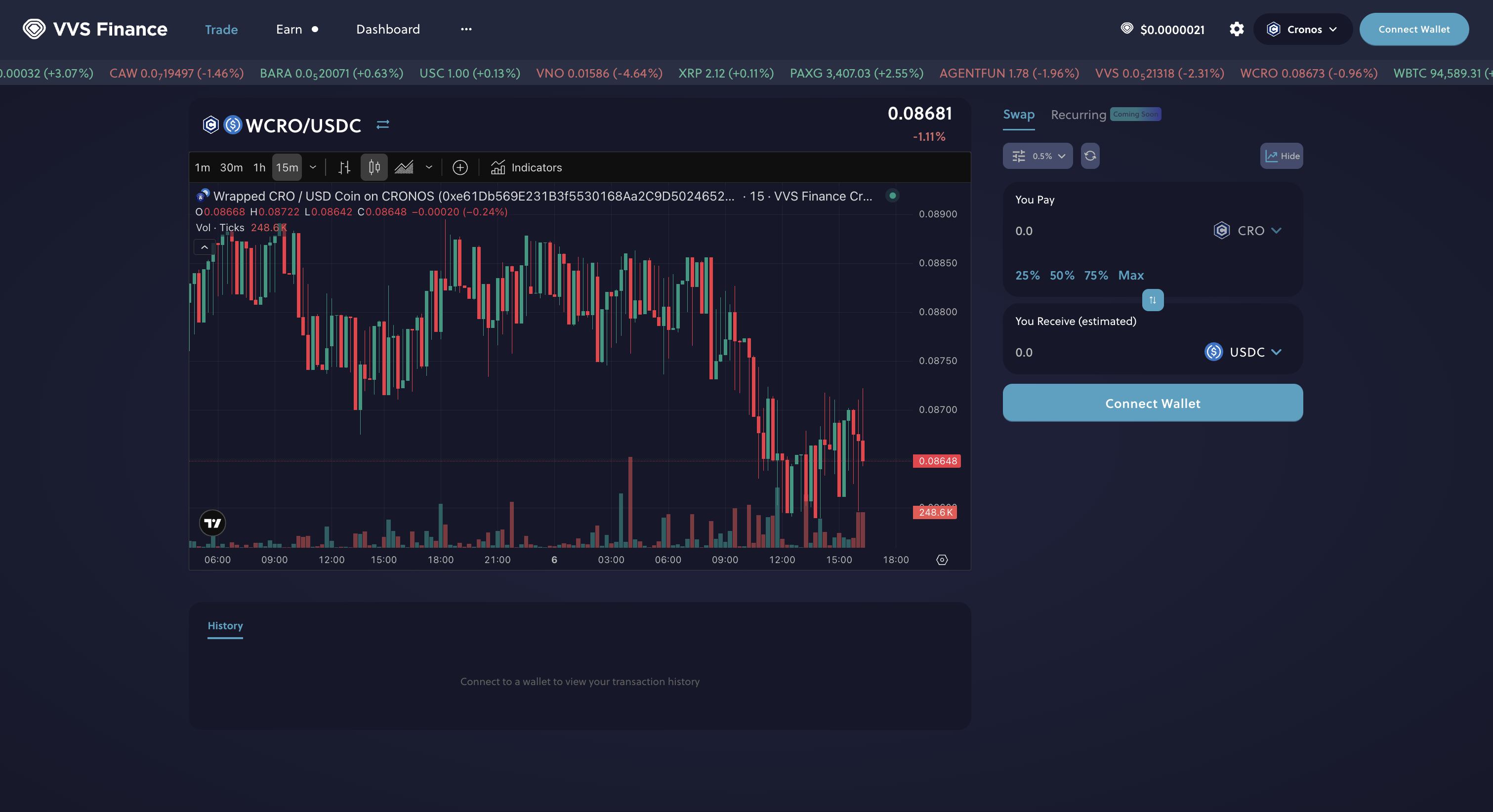


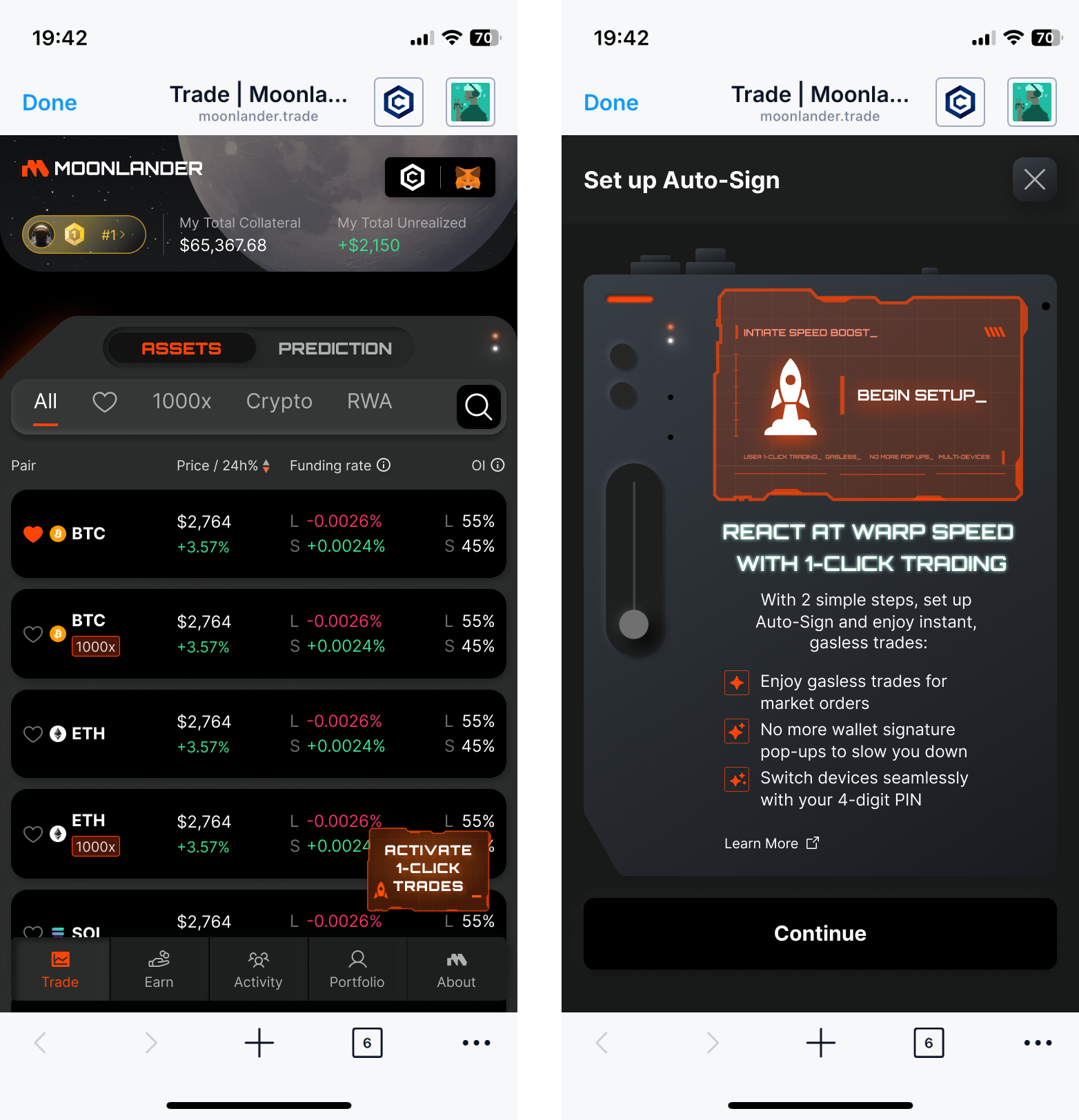




.jpg?alt=media&token=359ba569-ca84-402f-95db-abce34d5fb92)